
DS V01 GSM Control Device
Control your pump, irrigation motor, solar drive and lighting from anywhere, with no distance limits. DS V01 is controlled directly from the control centre in the Dilsiz Solar app; thanks to its SIM card, it works wherever there is GSM coverage.
- Manage from the app’s control centre
- 1 × 5 A relay output
- 1 × dry-contact digital input
- −40 °C to +80 °C

Manage it from the control centre in the Dilsiz Solar app
DS V01 connects directly to the control centre in the Dilsiz Solar app (the Manage Drive screen). As soon as your device is linked to your account, it appears in the app; no separate app, computer or complicated setup is needed.
Switch on/off with one tap
Switch the relay output on or off in the app, and instantly see its operating and connection status.
Day and time schedule
Set start and end times for each day of the week. Schedules keep running even when your phone is off.
Input status
Monitor the status of a float switch, pressure switch or sensor using a name you choose (e.g. “Water level”).
Notifications and alerts
Get notified when the pump starts or stops. If the drive’s fault output is connected to an input, fault alerts will also appear in the app.
Authorised users
Share the device with family or employees, and set separate permissions for monitoring and control.
Command log
Every command sent is logged with its date and time.
Remote control in four steps
We guide you through the process, from installation to your first command in the app.
Control panel installation
The device is installed in your electrical panel using its DIN-rail enclosure, with the external antenna positioned outside the panel.
SIM card
A GSM SIM card is inserted into the device. The SIM needs mobile data for control through the app.
Link to your account
Dilsiz Solar links the device to your account in the app and names the inputs and outputs.
Control from the app
Use the control centre to switch on/off, set schedules and monitor input status.
From fields to homes, warehouses to car parks
DS V01 offers a wide range of applications for both industrial and personal needs.
Agriculture and irrigation
Remote control of irrigation motors, submersible pumps and solar pump drives. Start irrigation without going to the garden.
Tank and water level
Automatically stop the pump via a digital input when the tank is full, and send instant SMS alerts to 3 different registered numbers.
Power outage detection
Get instant alerts for power outages affecting sensitive systems such as aquariums and incubators, and for transformer theft.
Security systems
Create alarm scenarios by integrating with security equipment such as PIR motion detectors.
Lighting
Turn home, vineyard and garden lights on or off remotely or on a day-and-time schedule.
Parking and access control
Remotely trigger parking barriers and access control systems.
Three ways to control, one device
The app is the recommended method; calls and SMS provide backup options in any situation.
Dilsiz Solar app
Switch on/off from the control centre, set schedules, check input status, manage notifications and authorised users. Free on the App Store and Google Play.
Control by phone call
Call the device’s number and use the keypad to control it quickly and free of charge.
Control by SMS
Use password-protected SMS commands to run the relay on a timer and check its status and grid signal strength. Contact us for the command list.
Designed for demanding field conditions
Wide operating voltage, industrial DIN-rail enclosure and an operating range of −40 °C to +80 °C.
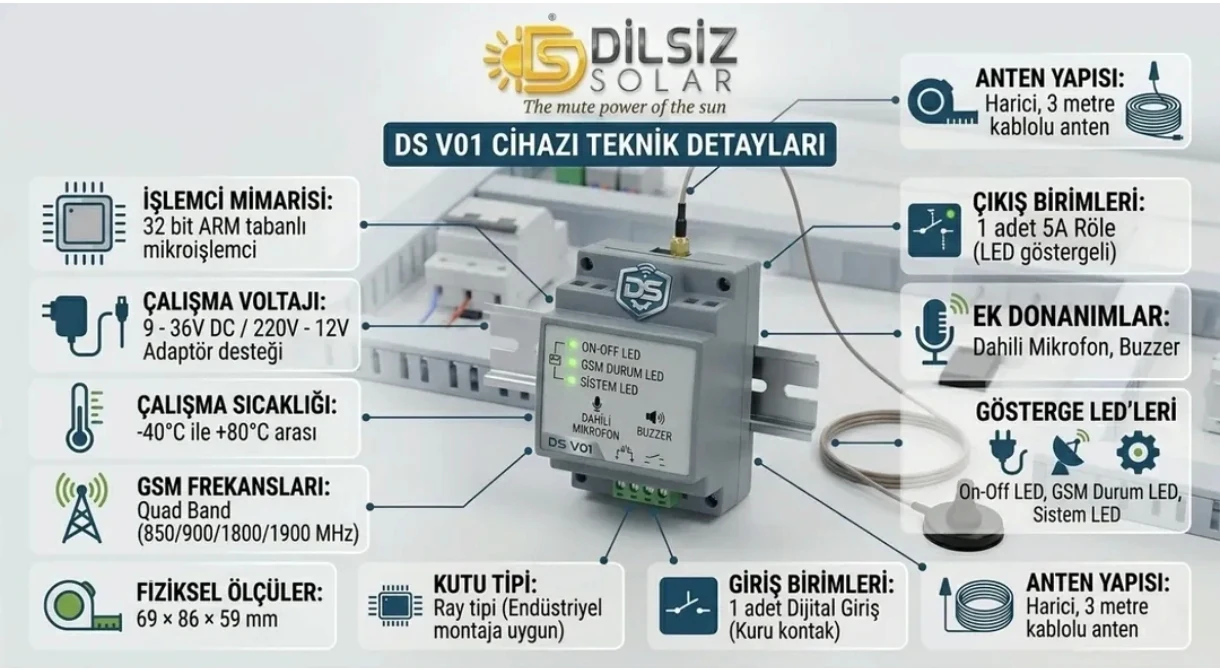
| Processor | 32-bit ARM-based microprocessor |
|---|---|
| Operating voltage | 9–36 V DC or 220 V / 12 V adapter |
| Operating temperature | −40 °C to +80 °C |
| GSM frequencies | Quad band: 850 / 900 / 1800 / 1900 MHz |
| Output | 1 × 5 A relay (with LED indicator) |
| Input | 1 digital input (dry contact) |
| Additional hardware | Built-in microphone, buzzer |
| Indicator LEDs | On-Off LED, GSM status LED, system LED |
| Antenna | External, with 3-metre cable |
| Enclosure type | Rail type, suitable for mounting in industrial control panels |
| Dimensions | 69 × 86 × 59 mm |
| Control methods | Dilsiz Solar app, calls, SMS |
| Manufacturer | Dilsiz Solar |
Smart digital input: The dry-contact input on the device lets you create scenarios based on signals from sensors or buttons. For example, when a tank is full, the pump stops automatically and an SMS is sent to the registered number 3.
DS V01 User Manual
Everything you need, from installation and connections to app controls, LED indicators and troubleshooting, in one file.
- Safety warnings
- Technical specifications
- Panel mounting and connections
- SIM card and antenna
- LED indicators
- Control from the app
- Control by phone call
- Digital input and alarm
- Troubleshooting
- Warranty and support
Quick start
- Disconnect the power; mount the device on the rail in the panel.
- Connect the external antenna and position it outside the metal panel door.
- Insert a SIM card with mobile data enabled and PIN requests disabled.
- Connect the power supply (9–36 V DC or a 220 V / 12 V adapter) and switch on the power.
- Check that the GSM status LED indicates a network connection.
- Once Dilsiz Solar has linked the device to your account, send the first command from the app’s control centre.
Safety warnings
- Make connections with the power off; have an authorised electrician carry out the installation.
- Do not connect loads exceeding 5 A to the relay output; control motors via a contactor or drive.
- The digital input is a dry contact; do not apply external voltage to it.
- Install the device in a panel protected from moisture, water and direct rain.
Frequently asked questions about DS V01
Do I need the Dilsiz Solar app to use DS V01?
The Dilsiz Solar app is the main control centre for DS V01: on/off, schedules, input status and notifications are managed through the app. If you cannot access the app, you can also perform basic controls by calling the device or sending it an SMS.
How does the device appear in the app?
Dilsiz Solar links your device to your account in the app. Once linked, it appears under its own name in the app’s control centre (the Manage Drive screen). We set the output and input names according to how you use the device (e.g. “Submersible pump”, “Water level”).
Which SIM card should I use?
A SIM card from a mobile network operator is used. To control the device via the app, the SIM needs mobile data; to receive SMS notifications, it needs an SMS allowance. Before inserting the SIM card, we recommend turning off the PIN code prompt on a phone.
Can I connect the pump motor directly to the device?
No. The relay output is 5 A. High-current loads such as pump motors must be connected via a contactor or the control input of a solar pump drive. For your safety, we recommend having our team or an authorised electrician carry out the installation and connection.
Can more than one person control the device?
Yes. You can share the device with family members or employees. We can set up together who can only monitor it and who can switch it on or off.
Does my phone need to be on for schedules to work?
No. The schedules you set in the app for specific days and times run on the server, so they continue to work even when your phone is off or not connected to the internet.
Where can I get the DS V01?
You can get the DS V01 directly from Dilsiz Solar. For pricing, orders and installation, message us on WhatsApp or call us. Warranty terms are provided at the time of sale.
Put control at your fingertips with the DS V01
Message us for pricing, orders and installation. We can plan the right connection for your existing pump and drive system together.